 WhatsApp: +86 18020776782
 Time: 24/7/365 Support

Hot Categories
EMERSON A6120 Troubleshooting: Common Issues and What to Check2026-08-12
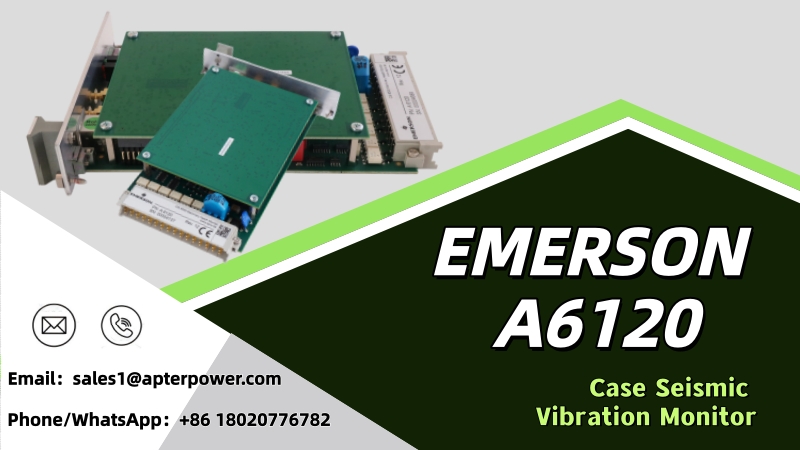
The EMERSON A6120 is a two-channel Case Seismic Vibration Monitor used in machinery protection systems for critical rotating equipment. It monitors vibration signals and compares measured values with configured alarm settings, helping operators identify abnormal machinery conditions and respond before they develop into more serious problems.
Like any part of a machinery monitoring system, the EMERSON A6120 may sometimes show unusual readings, signal changes, or unexpected alarms. That doesn’t always mean the A6120 itself is faulty. Before considering a replacement, it’s worth checking the vibration sensor, wiring, power supply, and connections first. In some cases, the reading may simply reflect a real change in the machine’s operating condition.When an EMERSON A6120 is not working as expected, the following checks can help narrow down the possible cause.
1. Check the Power Supply and A6120 Module
If your EMERSON A6120 suddenly stops working or starts behaving differently, check the power and connections first. It sounds simple, but loose connections and power issues are easy to overlook, especially after maintenance has been carried out on the system.
Take a look at the A6120 and its status indicators. Make sure the module is sitting properly in the rack and that the connections haven’t worked loose. If the problem started just after the module was replaced or other work was done on the rack, go back over that work before assuming the A6120 itself has failed.
Older monitoring systems may need a little more attention. Years of operation can leave connectors dirty, loose, or corroded. Look for anything that seems out of place, including damaged contacts or signs of overheating. In many cases, checking these basics first can save time and prevent an unnecessary A6120 module replacement.
2. Inspect the Vibration Sensor and Wiring
If the A6120 is powered but the vibration reading is missing, unstable, or clearly different from what you normally expect, check the measurement chain rather than immediately replacing the monitor.
The A6120 works with vibration sensor signals, so a problem elsewhere in that signal path can affect the value displayed by the monitoring system. Inspect the sensor, cable, terminals, connectors, and associated wiring for obvious problems. Loose connections, damaged cables, poor contacts, or an incorrect sensor installation can all interfere with reliable vibration measurements.
Pay particular attention if the abnormal reading started after machinery maintenance, sensor replacement, rewiring, or other work around the equipment. Comparing the affected channel with previous operating data or another known-good channel may also help determine whether the problem is coming from the machine, sensor circuit, or monitoring hardware.
3. Review Alarm and Configuration Settings
An alarm does not automatically mean that the A6120 is defective. The monitor is designed to compare measured vibration parameters against configured alarm limits, so unexpected alarms can also be related to the settings used in the monitoring system.
If alarms begin appearing after commissioning, maintenance, configuration changes, or module replacement, review the relevant configuration carefully. Check whether the measurement and alarm settings are appropriate for the machine and application.
It is also useful to compare the current configuration with previously documented settings when those records are available. Avoid changing alarm limits simply to stop an alarm. If the vibration level has genuinely increased, raising the limit could hide a developing machinery problem rather than solve it.
4. Check Whether the Vibration Is Coming From the Machine
Before blaming the EMERSON A6120, it’s worth checking the machine itself. A high vibration reading can simply mean the monitor is doing its job and picking up a real change in the equipment.
This is especially important with pumps, compressors, turbines, fans, and other rotating equipment. Wear, imbalance, loose parts, or changes in operating conditions can all affect vibration levels. If the reading has been slowly increasing, or only rises when the machine is running at a certain speed or load, take a closer look at the equipment before replacing the A6120.
Previous vibration records can be useful here. Compare the latest reading with earlier data and, where possible, check other monitoring channels on the same machine. When several channels start showing changes around the same time, the problem may be with the equipment rather than the vibration monitor.
A quick check of the machine can save you from replacing a perfectly good A6120 vibration monitoring module and, more importantly, may help catch a mechanical problem before it leads to an unplanned shutdown.
5. Check the Rack, Connections, and Operating Environment
The A6120 does not operate independently; it is part of a larger machinery monitoring and protection system. For that reason, troubleshooting should also include the rack, module connections, and surrounding operating environment.
Check that the monitor is installed correctly and that there are no obvious problems around the rack. Excessive temperature, dust, moisture, vibration, poor electrical connections, or aging system components may affect long-term reliability. Older machinery protection systems deserve particular attention because connectors, power components, wiring, and other hardware may have been operating continuously for many years.
If multiple modules begin showing unusual behavior at roughly the same time, this can be an important clue. Instead of assuming that several monitors failed simultaneously, check shared elements such as the rack, power supply, grounding, wiring, and system connections.
6. Know When to Consider Replacing the A6120
If the power supply, sensor, wiring, configuration, machine condition, and rack have all been checked but the problem remains, the A6120 itself may require further inspection or replacement.
Before ordering another module, record the complete model information and compare it with the existing unit. Do not rely only on the name “A6120,” especially when working with an older machinery protection system. Check the product label, system configuration, and other available identification information to make sure the replacement is suitable for your equipment.
For discontinued or older automation components, the condition of the replacement is also important. Depending on availability, you may encounter new, surplus, used, or refurbished units. Ask the supplier about the actual condition, testing, warranty, stock availability, and delivery time before placing an order.
If equipment downtime is already affecting production, providing photos of the original module and its label when requesting a quotation can make identification easier and reduce the risk of ordering the wrong spare part.
A Practical Approach to A6120 Troubleshooting
When an EMERSON A6120 shows an abnormal condition, replacing the module immediately is not always the best first step. Begin with the power supply and module status, then work through the sensor and wiring, configuration, actual machine vibration, and rack conditions. This helps separate a genuine module problem from issues elsewhere in the measurement system.
More importantly, never ignore an unexpected vibration alarm simply because you suspect an electronic problem. The A6120 is part of a machinery protection system, and the measured change may represent a real change in the condition of the equipment.
If testing confirms that the existing A6120 needs replacement, make sure the replacement module matches your system before ordering.
Looking for an EMERSON A6120? We supply high-quality industrial automation and machinery monitoring components at competitive prices, along with a wide range of products from other major brands. Contact us for current stock, pricing, and product information.
Looking for reliable industrial automation parts at competitive prices? We offer a wide range of products from leading brands, with fast response and worldwide service. Contact us today for pricing, availability, and product details.
Sales manager:Jim Pei
Wechat: ZXH18020776782
Phone/WhatsApp:+86 18020776782
- Contact Us
-
Who are we?
ARWELL is a global supplier of PLC, DCS, VFD, HMI and other industrial automation components.We provide industrial automation parts and sourcing solutions for a wide range of applications.
 ZXH18020776782
 sales1@apterpower.com

Copyright © 2024 ARWELL LIMITED
Disclaimer: ARWELL sells new and surplus products and develops channels for purchasing such products. This website has not been approved or recognized by any of the listed manufacturers or trademarks.
ARWELL is not an authorized distributor, dealer, or representative of the products displayed on this website. All product names, trademarks, brands, and logos used on this website are the property of their respective owners. The description, explanation, or sale of products with these names, trademarks, brands, and logos is for identification purposes only and is not intended to indicate any association with or authorization from any rights holder.